
What Is Adult VR and Why You’ll Crave It
Adult VR places you inside immersive 360° experiences powered by modern standalone headsets, spatial audio, and responsive interaction. With sharper visuals, wireless freedom, and intuitive controls, today’s VR devices create a more personal, private, and deeply engaging way to explore premium adult content.
New to Adult VR?
Start with a standalone headset that works right out of the box. Meta Quest devices offer the easiest setup and the widest compatibility with VR video players.
Want the Best Overall Experience?
Modern standalone headsets combine strong visuals, wireless comfort, and simple app access — making them the most popular choice for immersive adult VR.
Chasing Maximum Visual Fidelity?
High-end PCVR headsets like Valve Index or Vive Pro 2 deliver powerful performance and deep customization — ideal for advanced users with a gaming PC.




Why Choose VR
Ultimate Immersion
Experience high-resolution immersive 3D environments powered by modern lenses with hyper‑real visuals and interactive elements that place you in the center of adult scenes, amplifying sensation and emotion.
360° Realism
Look around and feel present with seamless 360° rendering of intimate adult scenes, with every angle and detail delivering an unparalleled sense of presence optimized for today’s standalone VR headsets.
Spatial Audio
Hear precision-tracked spatial audio to on‑screen action, enveloping you in immersive soundscapes that heighten emotional impact and bring VR adult content to life.
Total Privacy
Enjoy adult VR experiences in private, distraction‑free settings—shielded from prying eyes and interruptions—so you can fully indulge in your fantasies without worry or embarrassment.
Interactive Control
Interact with VR scenarios in real time, adjusting pacing, perspectives, and intensity to tailor each adult scene to your personal preferences and immersive pleasure, with intuitive controller.
Hands‑Free Freedom
Modern standalone VR headsets reduce cable clutter and complex setup, granting you hands‑free immersive adult content anytime, anywhere for seamless, unbroken pleasure sessions.
Guide to VR Headsets for Adult VR Content (2026)
The Meta Quest 3 is widely considered the best all-around standalone VR headset for most users, offering a strong balance of price, performance, and ease of use. It’s a standalone device (no PC or console needed) that hits a sweet spot of price (~$499 for 128 GB model) and performance. The Quest 3 features high-resolution LCD panels (2064×2208 per eye) with pancake lenses tomsguide.com, giving a combined ~4K image that’s about 30% sharper than its predecessor tomsguide.com. Visuals are crisp enough for 4K–6K adult videos, and Snapdragon XR2 Gen2 chip means smoother playback even with high-bitrate footage. Audio & Comfort: It has built-in spatial speakers that direct sound toward your ears – quality is decent (you’ll hear stereo 3D audio) but for thumping bass or privacy you can plug in headphones.
Interactivity:
Quest 3 includes Touch Plus controllers with haptic feedback and supports improved optical hand-tracking. While hand-tracking isn’t perfect for complex games, it’s fun for basic menu navigation – and yes, you can even use just your hands to control a VR video player if you want.
Compatibility:
Because Quest 3 runs the Meta Quest platform, you can install VR video player apps. Meta’s store won’t allow explicit adult apps, but popular neutral players like DeoVR or Skybox VR are available and can be used to watch your own videos. For streaming content from adult sites, many users sideload the SLR (SexLikeReal) app or use Quest’s built-in browser. Many users access web-based VR content through the built-in browser, while others prefer sideloaded players or local video playback depending on their setup.
Pros:
Completely wireless standalone design with easy setup and a large VR app ecosystem. You can copy downloaded VR videos to the headset or even connect the Quest 3 to a PC via Oculus Link/Air Link or Virtual Desktop to stream PC-only players – giving flexibility to enjoy content from any source. The device is comfortable and features full 6DOF tracking (you can move around and the view shifts, though for 180° adult videos you’ll likely just sit and look around).
Cons:
Battery life (~2–3 hours) limits very long sessions. Also, since you may need to sideload adult apps (not hard, but an extra step), total beginners might have a small learning curve. Extremely high-bitrate 8K videos may require optimized playback settings depending on the file.
Current Usage & Positioning:
The Quest 3 remains one of the most popular standalone headsets for adult VR thanks to its balance of performance, comfort, and accessibility. It’s frequently recommended as the default starting point for new users because it works well with both browser-based streaming and local video playback.
Best for: First-time adult VR users who want a wireless, hassle-free experience without needing a gaming PC.
Apple Vision Pro is a premium mixed-reality headset focused on ultra-high-resolution displays, eye-tracking, and gesture-based interaction. Think dual ultra-high-resolution micro-OLED displays (~23 million pixels total) tomsguide.com. This means razor-sharp visuals ideal for movies. Instead of traditional controllers, it relies on eye-tracking, hand gestures, and spatial input. The built-in spatial audio pods deliver high-quality 3D sound around your ears. In theory, it’s a fantastic device for immersive videos.
Pros:
Exceptional display clarity, premium build quality, seamless Apple ecosystem integration, and intuitive gesture controls.
Cons:
The price is around $3,500 – extremely steep. More importantly for adult content, Apple’s walled-garden approach is a limitation. visionOS operates within Apple’s closed ecosystem, which limits native VR video playback options and prevents traditional sideloading workflows used on other headsets. (Apple’s App Store forbids porn) decrypt.codecrypt.co. Out of the box, it won’t directly play common VR porn formats (no easy VR180 or 360° playback) decrypt.co. While the hardware is capable of extremely high-resolution video playback, current software limitations mean immersive VR180 and 360° formats may require workarounds or web-based solutions. decrypt.co. For example, enabling experimental WebXR in the Safari browser could eventually allow 3D web content, but as of 2025 it’s glitchy and not full-screen decrypt.co.
Tips:
Some users experiment with web-based VR playback through Safari’s advanced settings, but support varies and the experience may not match dedicated VR platforms. Also, be mindful of Apple’s content policies – you might need to use very “work-safe” descriptions for any personal videos.
Current Positioning:
Vision Pro remains a premium niche option for immersive media rather than a mainstream choice for adult VR. Its hardware is exceptional, but ecosystem restrictions mean most users looking specifically for adult VR content tend to prefer more open standalone headsets.
Best for: Tech enthusiasts interested in premium displays and mixed-reality experiences rather than dedicated adult VR playback.
The Meta Quest 2 is an older standalone headset that remains a popular budget entry point for adult VR thanks to its affordability and large user base. It’s a standalone headset like the Quest 3, and while not as powerful, it offers a lot of bang for the buck (often found at lower prices on resale or refurbished markets). Quest 2 uses LCD panels at 1832×1920 per eye tomsguide.com – roughly 50% more pixels than the older Quest 1, which made a big difference in video clarity tomshardware.com. In practice, it can play up to 4K VR videos smoothly toolify.ai, and even many 5K or 6K 180° videos with proper encoding.
Pros:
Very easy to use, fully wireless, and widely available on the second-hand market. It has the same built-in audio style as Quest 3 (basic positional speakers) and supports both controllers and hand tracking (Meta improved Quest 2’s hand-tracking through updates, so you can navigate menus or certain apps with your hands). The Quest 2 supports all the same apps and methods as Quest 3: you can use the Oculus Browser for web-based content, or install a VR video player app. DeoVR was available on the Quest store and is a common choice – it’s a general VR video player that can load files or stream from certain integrated sites. Another option is Skybox VR Player for offline files. For a more full-featured adult experience, you can sideload the SLR app (which gives access to SexLikeReal’s streaming service and interactive scripts if you have haptic toys). There’s a whole ecosystem built around Quest 2, so plenty of tutorials exist on watching adult VR with it.
Cons:
As an older-generation headset, the Quest 2’s graphics chip sometimes struggles with the largest video files (for example, an extremely high-bitrate 8K files may require optimized encoding or lower playback settings.). Its passthrough is only black-and-white (irrelevant for videos, but means no fancy mixed-reality). Also, field of view and comfort are slightly behind newer models – you might notice a bit more screen-door effect or need a better strap for long wear. Still, the visuals are solid for most people.
Tips:
For best playback performance, many users choose mid-to-high resolution downloads and adjust player settings based on their comfort and performance preferences. If streaming directly, ensure a strong Wi-Fi connection or the video might buffer.
Current Positioning:
Quest 2 is now considered a budget-friendly legacy headset rather than a flagship option. Thanks to its massive install base, many adult VR users still rely on it, and software support continues for most core features. It’s best suited for newcomers who want to explore VR without investing in newer hardware.
Best for: Budget-conscious users or first-time VR viewers looking for an affordable standalone experience.
The Pico 4 is a standalone VR headset positioned as an alternative to Meta’s Quest lineup, offering high-resolution displays and a lightweight design, but made by ByteDance (yes, the company behind TikTok). It’s known as a strong alternative to Meta’s headsets if you prefer not to use Meta’s ecosystem techradar.com techradar.com. The Pico 4 hardware actually one-ups the Quest 2 in some areas: it boasts 2160×2160 resolution per eye (about 35% more pixels than standard 4K) reddit.com, giving very sharp visuals for video content. It’s lightweight with pancake lenses and has a balanced design, making it comfortable for watching longer videos.
Pros:
No Meta account required — users create a Pico account instead. The higher resolution and a wide field of view and higher pixel density contribute to crisp visuals and strong immersion, especially text or fine details in a scene. Like the Quests, Pico 4 is 6DOF (full head tracking) and comes with 2 motion controllers for interactive content. It also supports hand tracking to some extent. The device’s audio is built-in via off-ear speakers (quality on par with Quest’s – okay for most uses, or you can use the 3.5mm jack for headphones). Another plus: It ssupports Wi-Fi 6/6E streaming and official PC connection software, allowing it to function as both a standalone and PCVR headset.
Cons:
Availability varies by region, with stronger market presence in Europe and parts of Asia than in North America. This means if you’re elsewhere, getting one might involve import fees. Its content library for games is improving but still behind, which matters less for just video viewing. One minor con is the online community and tutorial ecosystem are smaller compared to the Quest platform.
Compatibility:
Pico 4 runs on an Android-based operating system, allowing installation of various VR video players through official channels or sideloading. For instance, DeoVR has an Android version that can be sideloaded. Some adult content platforms provide Android-compatible apps or web-based access. You can also use the built-in Pico browser to visit web-based VR portals. So in practice, you won’t be locked out of adult content – it just might require a couple of extra steps to set up your preferred app.
Price:
Pricing varies by region and storage configuration, and it is typically positioned competitively within the standalone VR market.
Current Positioning:
Pico 4 remains a relevant standalone alternative for users who prefer a non-Meta ecosystem. While it does not match the Quest platform’s global user base, its display quality and comfort make it a solid option for immersive video viewing in supported regions.
Best for: Users outside the Meta ecosystem who want a lightweight standalone headset with strong display clarity.
Valve’s Index is a PC-tethered VR headset designed for enthusiasts who want precise tracking, strong audio, and deep SteamVR compatibility. It’s a bit older (originally released as a high-end PCVR kit, positioned at the premium end of the market), but still one of the more powerful VR headsets for visual clarity and tracking techradar.com techradar.com. The Index has dual LCD displays at 1440×1600 per eye (for a combined 2880×1600) gamesradar.com. While newer standalone headsets offer higher pixel counts, the Index balances resolution with high refresh rates and a wide field of view. This means smooth motion and less screen-door effect, which can reduce eye strain during long viewing. Its standout feature is the audio quality – the Index includes built-in off-ear speakers that hover near your ears, providing rich, full 3D sound. These speakers are widely regarded among VR enthusiasts as some of the best integrated audio solutions available.
PROS:
When paired with a capable gaming PC, the Index can handle extremely high-bitrate VR video playback with minimal compression. It’s compatible with SteamVR and any PC VR apps, so you have your pick of players (e.g. DeoVR’s PC version, HereSphere, Whirligig, or the SLR app for Windows). Interactivity is top-notch: the Index comes with Valve “Index Controllers” (often nicknamed Knuckles) that track individual finger movements, which doesn’t matter for 360° videos but shines in interactive VR games or simulated experiences. It also uses external base station trackers which give very precise 6DOF tracking in a room.
CONS:
Compared to modern standalone headsets, setup requires more space, cables, and PC configuration. You’ll need to mount or place two tracking base stations in your room, connect the headset via cables to your PC (tethered by a long cord), and ensure your PC meets specs (a capable VR-ready gaming PC is required for smooth performance gamesradar.com). The initial installation can be a pain to set up with multiple wires and sensors techradar.comtechradar.com. This isn’t as plug-and-play as a standalone headset. Another con is the cost: even though it’s a 2019 device, Valve still sells it at a premium, and there’s no standalone capability – it’s useless without a PC. The Index focuses on external tracking rather than mixed-reality features like passthrough or hand-tracking.
Unique Tips:
Advanced users often adjust supersampling or playback settings through PC-based VR players to maximize visual quality. The Index can also work with interactive sex toys synced via PC apps if you’re exploring that route, since the PC gives flexibility for multitasking various devices.
Current Positioning:
The Valve Index remains a respected PCVR headset favored by enthusiasts who value precise tracking, comfort, and exceptional audio. However, many new adult VR users now lean toward standalone devices for convenience. The Index is best suited for existing PCVR setups or users who prefer a tethered, high-performance environment.
Best for: PCVR enthusiasts with a powerful gaming setup who prioritize audio quality and precise tracking.
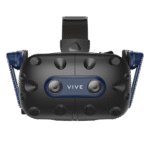
The HTC Vive lineup includes several PCVR headsets that have evolved over time, ranging from early SteamVR pioneers to modern high-resolution enthusiast devices. While older Vive models introduced many users to VR, today the focus is primarily on higher-end options like the Vive Pro 2. However, the original Vive had a low resolution (1080×1200 per eye) and relied on external base stations and wand controllers – the original model is now considered legacy hardware (if you find one cheap, it works with PC, but expect a screen-door effect and clunky feel). HTC didn’t sit still, though. They released improved versions: the Vive Pro (2018) bumped resolution to 1440×1600 per eye, similar to Valve Index, and added built-in headphones for better audio. It remains capable for VR video playback, though positioned firmly in the enthusiast tier. More recently, the Vive Pro 2 (2021) took resolution to an elite level: an astounding 2448×2448 per eye (4896×2448 total) – one of the highest-resolution consumer PCVR displays of its generation gamesradar.com. That means super crisp visuals, great for 8K VR porn scenes where you want maximum detail. The Pro 2 also has a wide 120° FOV and up to 120 Hz refresh, delivering top-tier immersion gamesradar.com.
PROS (Vive Pro 2 and similar):
Delivers extremely high visual fidelity when paired with a powerful PC, making it attractive for enthusiasts seeking maximum clarity. gamesradar.com It leverages PC power, so like the Index, any high-bitrate video or interactive content can run through it (assuming you have a beefy GPU to drive those pixels). Newer HTC models often support both SteamVR and HTC’s own software, giving you flexibility. For audio, the Vive Pro series includes integrated headphones that provide decent spatial sound (while different from Valve’s off-ear audio design, still capable of immersive spatial sound).
CONS:
Cost, complexity, and PC requirements. The Vive Pro 2 headset positioned at the premium end of the PCVR market, often requiring separate base stations and controllers. If you don’t already have base stations, that’s roughly another $200+, plus controllers (you could use Valve’s or older Vive wands). So the total package easily exceeds $1,000 – truly for enthusiasts gamesradar.com. Also, like the Index, it requires a powerful PC – to fully exploit that 5K-per-eye resolution you need a high-performance VR-ready gaming PC, otherwise you won’t get smooth playback gamesradar.com gamesradar.com. The setup is similar to Index: mounting base stations, dealing with cables, and possibly tweaking settings to get the best results gamesradar.com. HTC has also explored hybrid standalone designs such as the Vive XR Elite, a compact mixed-reality headset that can operate both wirelessly and with PCVR streaming. While technically capable of VR video playback, its premium price and niche positioning mean it appeals mostly to enthusiasts rather than mainstream adult VR users. It can be used for VR videos as a standalone (with an Android-based system like Pico/Quest), but its high price (~$1,099) and shorter battery make it a niche choice for consumers.
TIPS:
Advanced users often rely on PC-based VR players like HereSphere or DeoVR to fine-tune playback quality and projection settings. So take advantage of PC-centric players like HereSphere (a highly regarded paid VR video player that allows fine tuning of fisheye projections, etc.) or the free DeoVR PC app. For Vive Pro 2 users, ensure you install all drivers and consider wall-mounting your base stations for convenience gamesradar.com.
Current Positioning:
HTC’s Vive lineup remains relevant at the high end of PCVR, particularly for users focused on maximum visual clarity and customizable setups. While standalone headsets now dominate the mainstream adult VR market, Vive Pro models continue to attract enthusiasts who prioritize raw image quality and PC-powered flexibility.
Best for: Enthusiasts with a powerful gaming PC who want ultra-high-resolution visuals and don’t mind a tethered setup.
Sony’s PlayStation VR2 is a PS5-tethered headset designed primarily for console gaming, featuring modern OLED displays, eye-tracking, and advanced haptics. On paper, the PSVR2 has fantastic hardware for viewing VR videos: dual OLED screens at about 2000×2040 per eye (delivering high-contrast HDR visuals well suited for immersive media) engadget.com, a wide 110° field of view, and smooth 90–120 Hz refresh. It even features eye-tracking (used for foveated rendering in games) and built-in headset haptics (the headset can gently vibrate to enhance immersion). For audio, it relies on wired earbuds rather than integrated off-ear speakers, supporting Sony’s 3D Tempest audio for positional sound. The sense controllers are also top-notch for VR gaming, with adaptive triggers and haptic feedback.
PROS:
From a pure hardware perspective, PSVR2 offers excellent image quality and tracking precision – the high-resolution OLED panels mean great contrast and color (those intimate scenes have nice deep blacks and vibrant tones). It’s also very comfortable, and setup is simple: just one USB-C cable to your PS5.
CONS:
The main limitation is ecosystem access. PSVR2 operates within Sony’s closed PlayStation environment, which restricts third-party VR video apps and sideloading workflows commonly used on PC or standalone headsets. news.ycombinator.com. Unlike a PC or standalone, you cannot just sideload a random app. As of 2025, you’re basically limited to what Sony allows: there is no built-in media player for VR like the PS4 had news.ycombinator.comnews.ycombinator.com. You also can’t use YouTube VR (the PS5 YouTube app doesn’t support VR mode). A third-party app called Littlstar (now rebranded as “Rad”) that provided VR video on PSVR1 hasn’t yet fully launched on PS5, and they’ve struggled with playback and even plan a complicated subscription modelnews.ycombinator.comnews.ycombinator.com.
In short, if you plug in a PSVR2 and try to watch adult VR, you’ll find yourself pretty stuck – an amazing headset with no easy way to feed it adult videos. Some users experiment with unofficial methods or future PC compatibility projects, but these approaches vary in reliability and are not designed for mainstream adult VR viewing.
Bottom line:
If you already own a PS5 and PSVR2 for gaming, adult VR playback may be possible through limited or experimental methods. If you are considering buying a PSVR2 primarily for adult VR, it’s not recommended at this time – the hardware is great but the software support for porn isn’t there.
Current Positioning:
PSVR2 remains a strong console VR headset but is rarely chosen specifically for adult VR due to its restricted ecosystem. Most adult VR users prefer standalone or PCVR devices that allow direct access to web players and local media playback. While future software support could change this, PSVR2 currently serves better as a gaming-focused device than a dedicated adult VR solution.
Best for: PlayStation gamers who already own the hardware and are curious about VR media, rather than users seeking a primary adult VR headset.
Smartphone-based VR was once a common entry point into immersive video viewing, using simple viewers like Google Cardboard paired with a mobile device.
Pros:
It remains one of the most accessible ways to preview basic 3D VR video without dedicated hardware. If you have a decent smartphone, you can buy a Cardboard viewer for under $20 (or even make one) and start watching VR content quickly. There’s no additional hardware or accounts needed. For beginners curious about VR adult content, this is a low-investment trial to get a taste of 3D 180° videos. Both iPhones and Android phones can do this. You just load a 180° or 360° video (either through a mobile VR app or a web player that supports split-screen) and the phone’s gyroscope will let you look around the scene.
cons:
Smartphone VR is now considered legacy technology compared to modern standalone headsets. Official platforms like Daydream and Gear VR are no longer actively supported on modern devices. So while you can still do the generic Cardboard method, you’ll be dealing with clunky manual setups. Major apps like YouTube have mostly dropped VR support on mobile (no more Google Cardboard mode on iOS YouTube, for instance).
The experience itself has significant limitations: You only get 3DOF tracking (you can turn your head, but you can’t lean in or move closer to things – the video moves with you). The phone’s screen resolution, when split in half, yields a much lower effective resolution per eye. Because the phone display is split between both eyes, effective visual clarity is significantly lower than on dedicated VR headsets. Additionally, phones aren’t built for prolonged VR viewing: you may encounter overheating, notifications popping up, and you have to hold the viewer to your face or strap it on uncomfortably.
Compatibility:
Availability varies depending on platform policies and device compatibility. Some adult sites provide downloadable MP4 files that you can transfer to your phone. On iOS, the options are a bit more limited (Apple’s App Store is strict about adult apps), but you can still find VR video players or use Safari for web-based players (note: iOS Safari’s WebXR is experimental and disabled by default except on Vision Pro). In practice, many iOS users end up using apps like Mobile VR Station or similar, then loading their own videos.
tips:
Users experimenting with smartphone VR often prioritize lighter video files and headphones for a more comfortable experience. Also, use headphones for audio, since most phone viewers don’t pipe sound to your ears. And don’t expect to walk around – this is more like a stationary experience, essentially simulating what a VR headset would show if you were sitting down.
Current Positioning:
Smartphone VR is now viewed primarily as a curiosity or introductory experience rather than a long-term solution. While it can demonstrate basic 180° or 360° video concepts, most users quickly transition to standalone headsets for significantly better immersion, comfort, and visual clarity.
Also, note that Samsung Gear VR and Google Daydream (older smartphone VR platforms) are obsolete now – if you have those headsets and an older phone, they might still work with some tinkering, but their official apps/stores are dead. In summary, smartphone VR can display adult VR content in a pinch, if the experience feels interesting, upgrading to a modern standalone headset will provide a far more immersive and comfortable viewing experience.
Best for: Curious newcomers who want to preview VR video concepts without investing in dedicated hardware.
For context, here are several legacy or niche VR headsets you may still encounter and how they fit into today’s VR landscape.:
Oculus Quest 1 (2019):
The original Quest helped popularize standalone VR and was widely used for immersive video viewing during its peak years. It has a modest 1440×1600 per eye OLED display and can still run basic VR video apps. However, Meta dropped official support for Quest 1 by 2024, and newer apps might not work well. It’s effectively outdated now – if you have one, it can still be used with Skybox/DeoVR for local videos, but its performance on high-res streams will be limited. Most Quest 1 owners have upgraded to Quest 2 or 3.
Oculus Rift S (2019) and Oculus Rift CV1 (2016):
These were PC-tethered Oculus headsets. The Rift S (Lenovo-made for Oculus) had 1280×1440 per eye LCD screens and inside-out tracking, while the CV1 had 1080×1200 OLED and external sensors. Both are discontinued. The Rift S in particular is now considered legacy PCVR hardware (Oculus PC software still works, but no new units; The Quest platform with PC connectivity has largely replaced this lineup). If you find a used one, it can play VR videos via PC just fine, but an old Rift isn’t superior to modern standalone options except perhaps in comfort for CV1. Essentially, the Oculus PC line transitioned to Quest with Link, so these older headsets have faded from the userbase.
Oculus Go (2018):
This was a standalone 3DOF headset (no positional tracking) specifically good for media. It was popular for VR porn around 2018–2019 due to its low cost and ease. It had a 2560×1440 total resolution (1280×1440 per eye) and a simple controller. Facebook/Meta discontinued the Go in 2020. Today, the Go is considered legacy hardware with limited software support – it no longer gets updates and many new 8K videos won’t even play on its older chip. If you still have one, it can function as a basic viewer for 180° videos (and it has a great lens clarity), but it’s stuck on old software and not worth buying now.
Windows Mixed Reality (WMR) Headsets (2017–2020):
Headsets like the Lenovo Explorer (mentioned in the original list), HP Reverb, Samsung Odyssey, etc., were part of Microsoft’s WMR platform for PC. These vary in quality – e.g. the HP Reverb G2 (2020) is actually noteworthy for its 2160×2160 per eye resolution and clarity, making it excellent for VR videos. WMR headsets use inside-out tracking (no external sensors) and connect to PC. The Windows Mixed Reality ecosystem has seen reduced consumer focus in recent years, making it more niche within the broader PCVR space.
Still, the HP Reverb G2 remains notable for its high-resolution displays and is still used by some PCVR enthusiasts. On the other hand, something like the Lenovo Explorer (1440×1440 per eye LCD) is now old – it works for basic VR if you can find one cheap, but it’s no longer produced. So WMR as a category is a mixed bag: some devices (Reverb G2) are current and great for porn due to resolution, while others are outdated. The ecosystem is a bit niche but these headsets can run any PC VR video player (they appear as VR devices in SteamVR).
Pimax and Other Niche High-end Headsets:
Pimax produces enthusiast-focused PCVR headsets known for ultra-wide fields of view and extremely high resolutions. Enthusiasts who absolutely crave the most immersive visuals sometimes go for these. For instance, the Pimax 8K X or the newer Pimax Crystal have very high specs. They can make adult videos look stunning, but they tend to be expensive (> $1000) and require tweaking. These are used by a very small number of power-users in the adult VR community – these devices are typically aimed at advanced users comfortable with complex PCVR setups. For most people, these niche devices are overkill and have their own software quirks.
These legacy and niche devices help illustrate how quickly VR hardware evolves — most new adult VR users today gravitate toward standalone headsets for simplicity and accessibility.
In summary, the modern VR landscape has largely consolidated around a few key categories — standalone headsets like Meta Quest, enthusiast PCVR systems, and premium mixed-reality devices from Apple and others. Always consider ecosystem support and compatibility — a headset that can’t easily access the players or formats you need may limit your overall experience, regardless of price. Below is a quick comparison of the main headsets covered in this guide:
VR Headset | Category | Ease of Setup | Adult VR Suitability |
|---|---|---|---|
Meta Quest 3 | Best Overall Standalone | Easy | ⭐⭐⭐⭐⭐ |
Apple Vision Pro | Premium Mixed Reality | Moderate | ⭐⭐ |
Meta Quest 2 | Budget Standalone | Easy | ⭐⭐⭐⭐ |
Pico 4 | Standalone Alternative | Easy | ⭐⭐⭐⭐ |
Valve Index | PCVR Enthusiast | Hard | ⭐⭐⭐ |
HTC Vive Pro 2 | Ultra High-End PCVR | Hard | ⭐⭐⭐ |
Sony PS VR2 | Console VR | Moderate | ⭐⭐ |
Smartphone VR | Legacy Viewer | Easy | ⭐ |
VR Headset | Adult VR Suitability |
|---|---|
Meta Quest 3 | ⭐⭐⭐⭐⭐ |
Apple Vision Pro | ⭐⭐ |
Meta Quest 2 | ⭐⭐⭐⭐ |
Pico 4 | ⭐⭐⭐⭐ |
Valve Index | ⭐⭐⭐ |
HTC Vive Pro 2 | ⭐⭐⭐ |
Sony PS VR2 | ⭐⭐ |
Smartphone VR | ⭐ |
Table Key:
6DOF = six degrees of freedom (full positional tracking)
Inside-out = tracking using onboard cameras (no external sensors)
External (lighthouse) = tracking via external base stations
Final Thoughts: Choosing the Right VR Headset
Each headset above serves a different type of user. Standalone devices like Quest and Pico remain the most straightforward way to access adult VR content, while PCVR systems can deliver higher visual fidelity at the cost of setup complexity. Console and smartphone-based solutions tend to offer fewer playback options, so choosing the right balance between simplicity and performance is key. Console and phone-based solutions currently lag in convenience or support. Consider what balance of ease vs. quality you prefer. And remember, the broader VR community frequently shares setup advice and playback tips across forums and user groups, which can help you get the most from your chosen headset.
Explore responsibly and enjoy the immersive experience.
Sources: Device specifications and platform details were compiled from manufacturer documentation, developer resources, and community feedback. Information is periodically reviewed to keep this guide relevant as VR hardware evolves.
Frequently Asked Questions About VR Headsets for Adult VR
For most users, standalone headsets like Meta Quest 3 offer the best balance of ease of use, compatibility, and immersive quality. They don’t require a gaming PC and support popular VR video players through apps or browser access.
No. Modern standalone headsets such as Quest or Pico devices can stream or play VR videos directly. PCVR headsets like Valve Index or Vive Pro 2 are typically chosen by enthusiasts who want maximum performance and customization.
Apple Vision Pro has excellent display quality, but its closed ecosystem limits native adult VR apps and immersive playback options. It’s better suited for mixed-reality media rather than dedicated adult VR viewing.
Quest 2 remains a budget-friendly entry point for VR video viewing. While newer headsets offer better clarity and comfort, Quest 2 still works well for beginners exploring adult VR content.
PCVR devices require a gaming computer, external tracking setup, and additional software configuration. They can deliver higher fidelity visuals, but they are generally more complex compared to standalone headsets.
PSVR2 has strong hardware but limited adult VR support due to PlayStation’s closed platform. Most users interested in VR video playback prefer standalone or PC-based headsets instead
Phone-based viewers like Google Cardboard can demonstrate basic VR video concepts, but they are considered legacy solutions. Dedicated VR headsets provide significantly better comfort, tracking, and image quality.